 Liftonic
The Apple Watch lifting app that logs every set from your wrist
Liftonic's Apple Watch app shows the set you're on in big numbers. Tap Done to log it and your rest timer starts on its own, with your heart rate on the next screen. It comes with Liftonic for iPhone.
What the Watch app does
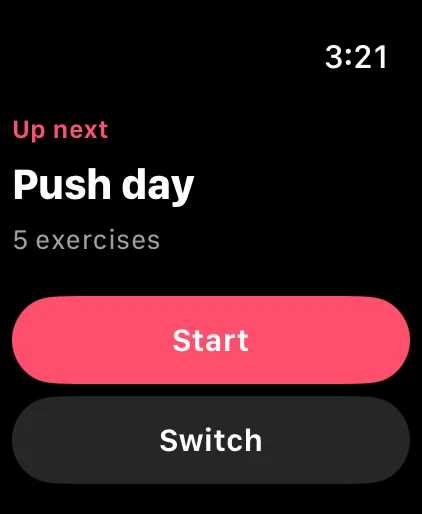
- Starts today's workout. Up next shows the workout your plan has for today. Tap Start, switch to another routine, or start an empty workout.
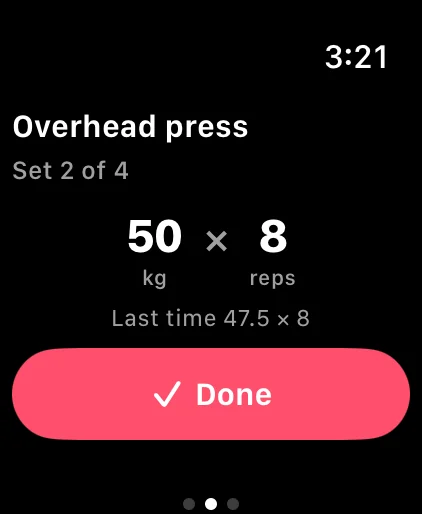
- Shows the set you're on. The exercise, the weight and the reps, big enough to read mid-set, plus what you lifted for the same set last time.
- Logs it in one tap. Tap Done when the set is finished. To change the numbers first, tap the weight or the reps and turn the Digital Crown.
- Runs your rest timer. Rest starts by itself after each set. Add 30 seconds or skip it, and your wrist taps you when it's time to lift again.
- Tracks heart rate. A second screen shows live heart rate and active calories, with Pause, Finish and Discard.
- Handles every kind of set. Weighted, bodyweight, timed holds and cardio, in kg or lb to match the app.
- Lives on your watch face. Complications show the next set and the rest countdown at a glance, in circular, corner, inline and rectangular sizes.
- Saves to Apple Health. The finished workout goes to Apple Health as a strength training workout, and every set lands in your Liftonic log on the iPhone.
Does it work without your iPhone nearby?
Partly. Your plan, routines and history live in the iPhone app, so keep the iPhone close when you start a workout. Once it's running, you can leave the phone in your bag or locker. If the Watch loses the connection mid-workout, it keeps logging your sets and shows "Syncs when iPhone is back". Everything catches up as soon as the two reconnect.
How to set it up
- Install Liftonic on your iPhone from the App Store. The Watch app comes with it. If it doesn't show up on the watch, open the Watch app on your iPhone and install Liftonic from the list of available apps.
- Open Liftonic on the iPhone once and sign in, so the Watch can see your plan.
- When you get to the gym, open Liftonic on the watch and tap Start. Allow heart rate access the first time.
Why log on your wrist
Logging from the phone means unlocking it, finding the right exercise and typing numbers between sets, often with chalk on your hands. On the Watch the right set is already on screen, so logging is one tap and your phone stays out of the way. The rest timer on your wrist also keeps your rest honest, which matters more than most people think: see how long to rest between sets.
New to the barbell? Start with the barbell guides, and use the plate calculator to load each set.
Questions
Do I need an iPhone?
Yes. The Watch app works with Liftonic on your iPhone: your plan, routines and history live there. Keep the iPhone nearby to start a workout. If it drops out of range mid-workout, the Watch keeps logging and syncs when the iPhone is back.
Which Apple Watch does it need?
Any Apple Watch with watchOS 10 or later, paired with an iPhone on iOS 17 or later.
Is the Watch app part of Liftonic Pro?
No. The Watch app is part of the workout log, which comes with the app. Pro adds the AI Coach without the monthly limit and the planning features.
Does it track heart rate?
Yes. During a workout the Watch shows your live heart rate and active calories, and the finished workout is saved to Apple Health as a strength training workout.
Can I change the weight or reps on the Watch?
Yes. Tap the weight or the reps and turn the Digital Crown, then tap Done. Bodyweight, timed and cardio sets work too.
The Watch app shows no workout. What do I do?
Open Liftonic on your iPhone once and make sure you're signed in, then open the Watch app again. The support page has more fixes.
The lift log and AI coach for iPhone, with the Apple Watch app included.